
Convert Logo to PCS Embroidery Format Easily with These Top Tools
Need your logo in PCS format for Viking/Husqvarna machines? Discover the top tools and services to convert logo to PCS embroidery format easily and accurately.
 AbsoluteDigitizing1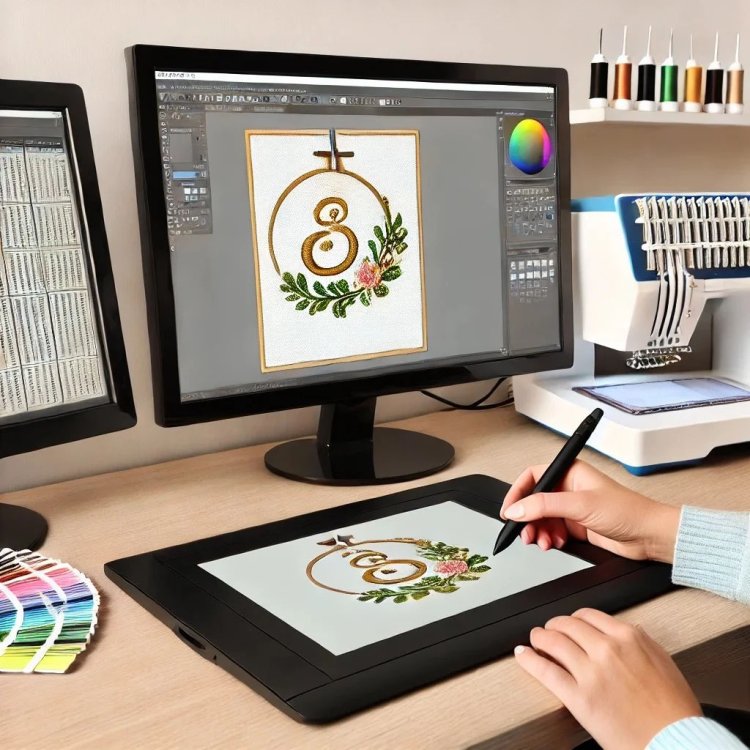
Introduction
Your logo is a vital piece of your brand's identity, and embroidering it onto garments is one of the most professional ways to showcase it. But if you own a Viking or Husqvarna embroidery machine, you know it requires a specific language: the PCS file format. That beautiful vector or high-resolution image on your computer isn't ready for the needle. Figuring out how to convert logo to PCS embroidery format is the essential step that bridges this gap. While "convert" makes it sound straightforward, the reality is a process called digitizing, which requires the right tools to do correctly. The good news is you don't need to be an expert to get a perfect result. By using the right modern tools and services, you can navigate this process easily, ensuring your logo stitches out with the crisp, professional quality your brand deserves. This guide explores the top, user-friendly options to get you from a digital file to a flawless PCS design without the usual frustration.
Understanding the Task: It’s Digitizing, Not Just Converting
First, let's clear up a common point of confusion. You can't simply change a file extension from .JPG to .PCS and expect your Viking machine to understand it. A logo image is a visual guide. A PCS file is a set of coded, mechanical instructions.
The true process of how to convert logo to PCS embroidery format is called digitizing. This involves a skilled translation where:
-
The outlines of your logo are traced to create stitch paths.
-
Different areas are assigned specific stitch types (satin for text, fill for shapes).
-
A hidden foundation of stitches (underlay) is added to prevent fabric puckering.
-
Adjustments are made to account for how fabric pulls during sewing.
The "top tools" we'll discuss are designed to make this complex task accessible, whether you're doing it yourself with smart software or partnering with an expert service.
Top Tool #1: Professional Digitizing Services (The Easiest Path)
For most people, especially businesses, this is the most reliable and truly "easy" method. You outsource the technical work to experts.
How it Makes Conversion Easy:
-
You Provide the Logo: Upload your best file (vector AI/EPS is ideal) to a service like Embrigitize, The Digitizing Corp, or a top-rated freelancer on Etsy.
-
They Handle the Complex Work: A professional digitizer uses high-end software (like Wilcom or Pulse) to manually digitize your logo with proper underlay, stitch types, and pull compensation. They ask you for key details like the garment type and size.
-
You Receive a Ready-to-Stitch PCS File: Within 24-48 hours, you get a perfectly engineered PCS file delivered to your inbox. Most include free revisions to ensure it stitches perfectly on your specific fabric.
Why it's a Top Tool: It requires zero software knowledge from you, guarantees a professional result, and saves you immense time. The fee is an investment that prevents costly wasted materials from a poor-quality file. This is the easiest way to ensure a flawless outcome.
Top Tool #2: Viking/Husqvarna Embroidery Software
For those who want in-house control and plan to convert many logos, investing in the native software is a powerful option.
Premier+™ 3 & DesignWorks Software:
This is the official software suite created for Viking and Husqvarna machines.
-
How it Makes Conversion Easy: It's built for the ecosystem. You can import image files and use its digitizing tools to trace and create PCS files directly. The learning resources are tailored to the software, and file compatibility is guaranteed.
-
Best For: Dedicated Viking/Husqvarna owners who are committed to learning digitizing and want the most integrated workflow. It's a significant investment but the most direct software path to a PCS file.
Top Tool #3: Multi-Format Embroidery Software
Some of the most popular professional software packages support PCS output, giving you a powerful all-in-one toolkit.
Hatch Embroidery by Wilcom:
Hatch is widely regarded as one of the most user-friendly professional-grade digitizers.
-
How it Makes Conversion Easy: It offers an intuitive interface with excellent auto-tracing features that create a great starting point from your logo. You can then easily edit stitch types and properties before exporting directly to PCS format. Its tutorials and community make learning easier.
-
Best For: Users who want a balance of professional power and an accessible learning curve. It's excellent for small businesses and serious hobbyists.
Embrilliance StitchArtist:
Embrilliance takes a modular, approachable path to digitizing.
-
How it Makes Conversion Easy: Its StitchArtist module provides a clean, logical workspace for manually digitizing your logo. It’s less intimidating than full suites and is particularly good for lettering and clean shapes, common in logos.
-
Best For: Those who prefer a more simplified, affordable software purchase and want to focus on the core digitizing steps.
Top Tool #4: Online Automated Converters (A Word of Caution)
A simple web search will reveal websites that promise instant logo-to-PCS conversion. It's crucial to understand these tools.
-
The Promise: Upload, click, get a PCS file in minutes for a few dollars.
-
The Reality: These use basic auto-digitizing algorithms. They do not create proper underlay or intelligent stitch paths. The resulting PCS file will likely cause puckering, poor detail, and machine errors.
-
When to Consider: Only for the absolute simplest, non-critical, single-color shapes where quality is irrelevant. For a professional brand logo, this is a high-risk path that often leads to wasted time and materials.
Your Easy, Step-by-Step Action Plan
Follow this process to ensure a smooth, successful conversion every time:
Step 1: Prepare Your Logo File
This is the most important step you control. Give your digitizer or software the best possible start.
-
Use a Vector File: If you have an .AI, .EPS, or .SVG from your designer, this is gold. It provides clean paths for tracing.
-
Simplify: Enlarge small text, thicken fine lines, and reduce complex color gradients.
Step 2: Choose Your Tool Based on Your Needs
-
For One Logo, Perfect Results, No Learning: Use a Professional Digitizing Service.
-
For Many Logos, Willingness to Learn: Invest in Software like Hatch or your machine's native program.
Step 3: Provide Critical Information
Always specify:
-
The Target Garment: Is this for a hat, a polo shirt, or a towel? This dictates the digitizing settings.
-
The Desired Size: Exact dimensions in inches or centimeters.
Step 4: The Non-Negotiable Test Stitch
Never, ever run a new PCS file directly on your final product.
-
Hoop scrap fabric identical to your final garment.
-
Stitch the design.
-
Inspect for puckering, clarity, and registration.
Step 5: Finalize and Stitch
If the test is perfect, proceed. If there are minor issues, use your service's revision policy or adjust your software settings. Then, stitch your final items with confidence.
Why the Right Tool Matters: Avoiding Costly Mistakes
Choosing an inadequate tool (like a $5 auto-converter) has real costs:
-
Wasted Materials: Ruined garments and thread.
-
Lost Time: Machine downtime and frustrating troubleshooting.
-
Damaged Brand Image: Unprofessional embroidery on your merchandise or uniforms.
Investing in a top tool—whether a service fee or quality software—protects you from these far greater expenses.
Conclusion
Learning how to convert logo to PCS embroidery format easily is about leveraging the right modern tools for your specific situation. For a guaranteed, professional result with minimal effort, a professional digitizing service is your easiest and most reliable top tool. For those embarking on a digitizing journey, user-friendly software like Hatch Embroidery or your machine's native Viking software provides the power to create in-house. By preparing your logo properly, providing key details to your digitizer, and always conducting a test stitch, you demystify the process. Ditch the anxiety and the risky auto-converters. Choose a top-tier tool from this guide, and transform your brand's logo into a pristine, stitch-perfect PCS file that makes your Viking or Husqvarna machine—and your brand—look its absolute best.